Why your signature is the best place for your card
You hand out a business card a few times a month. You send email every day, mostly to people you've met or want to meet: clients, partners, candidates, the person you were introduced to last week. A signature with your card puts a Save my contact button under every one of those emails, without an attachment and without asking anyone to do anything they don't already know how to do.
And because the button opens your digital business card, they get your current details, can call or message you from it, and can send you their own details back.
How to make your email signature
- Create your free card with your name, job title, company, phone, email and website. The signature uses exactly these.
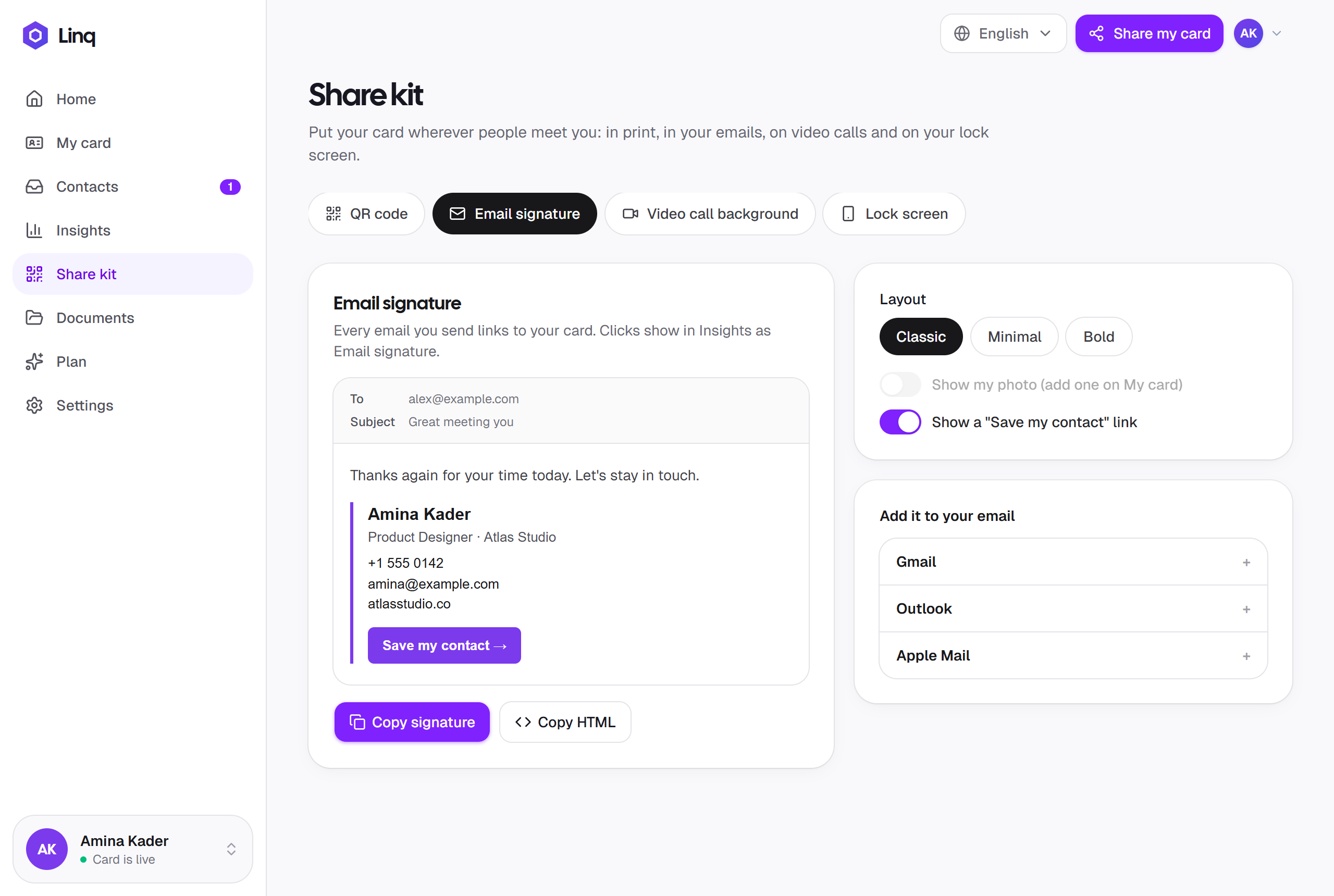
- Open the Share kit and pick a layout: Classic, Minimal or Bold.
- Choose whether to show your photo and the Save my contact link.
- Select Copy signature and paste it into your email app's signature settings. The steps for Gmail, Outlook and Apple Mail are right there on the page.
That's it. For email tools that ask for code, Copy HTML gives you the signature's HTML. Details in the Share kit.
Three layouts, your card's colors
- Classic. Your photo next to your details. The one most people pick.
- Minimal. Text only. For plain-text people, and for email tools that strip images.
- Bold. Your name on a band in your card color, for a signature people notice.
Each one shows your name, job title, company, phone, email and website, in your card color, with the Save my contact link. Nothing to design, and nothing to keep in sync by hand: it's built from your card.
Add it to your email app
The Share kit shows these steps next to the preview. In short:
Gmail
Settings → See all settings → General → Signature. Create a signature, paste, and set it as the default for new emails and replies. Save at the bottom of the page.
Outlook
Settings → Mail → Compose and reply → Email signature. Paste, name the signature, and choose it for new messages and replies.
Apple Mail
Mail → Settings → Signatures. Uncheck Always match my default message font, add a signature, and paste.
Formatting lost on paste? Use Copy signature rather than selecting the preview yourself, and paste straight into the signature settings. More in troubleshooting.
It stays current where it counts
The link in your signature opens your card, and your card is always the latest version. New number, new role, new photo: anyone who taps Save my contact gets today's details, even from an email you sent last year. The words written in the signature itself are text, so after a change, copy the signature again and paste it over the old one. Two clicks.
See what it brings in
Every tap on the signature's link is counted as Email signature in Insights, separately from your QR code, your shared link and your video call background. After a few weeks you know whether the signature does its job, and whether it's worth adding to every account you send from. The breakdown by source comes with Pro, at $5.99 a month; on Free you see your card views and new contacts. How Insights works.
No card yet?
The free email signature generator makes a clean text signature from a form, with no account. It's the same idea without the photo, the layouts and the link that stays current.
What makes a good signature
- Short. Name, role, company, one phone number, one link. People scroll past a wall of icons.
- One call to action. “Save my contact” does more than six social icons, because it puts you in their phone.
- Text, not a picture. A signature that is one image can't be copied, searched or read aloud, and often doesn't load. Linq's signatures are text with an optional photo.
- The same on every account. Work mail, personal mail, the phone app: paste it everywhere you send from.
More places to put your card: your QR code, your video call background, and the nine practical ways to share it.